
1.10. Recurring Preauth, Capture and Cancel
Introduction
Preauthorization is a transaction type in which bank blocks the specified amount in the Payer’s card account and does not allow the cardholder to use this blocked money. It is important to know that the block remains for a definite period of time depending on whether this is a debit or a credit card (usually the maximum block period is 7 days for debit cards and 28 days for credit cards).
See terms definitions (Connecting Party, 3DS Method, etc) in Glossary.
Recurring (Rebill) Preauth is a type of transaction in which funds are debited from the Payer’s side to the Connecting Party’s bank account with previously saved cardholder data. Recurring preauth transaction can be initiated manually on Payer’s behalf (this simplifies the payment process for the Payer) or automatically at certain intervals by Connecting Party (i.e. as a subscription model). Payer does not have to re-enter card information, Connecting Party uses Card reference ID to authorize payment. The necessity of Payer’s 3DS check and submit of card security code (CVC, CVV, etc) for recurring preauth transactions is determined by bank account settings and related to Connecting Party business type.
Capture is a transaction followed after preauth which deducts the locked amount from Payer’s card.
Cancel is opposite of Capture which cancels the deduction and returns locked amount back to Payer’s card.
Recurring payments are made in three steps:
1. Initial payment – make initial payment to verify and authorize the Payer’s card. Any transaction type with present cardholder data will work as initial payment - sale, preauth, transfer, etc.
2. Card registration – get Card reference ID and register Payer’s card in Payer’s profile. Card registration requires initial payment to be in final status.
3. Recurring preauth – process recurring preauth transaction using Card reference ID.
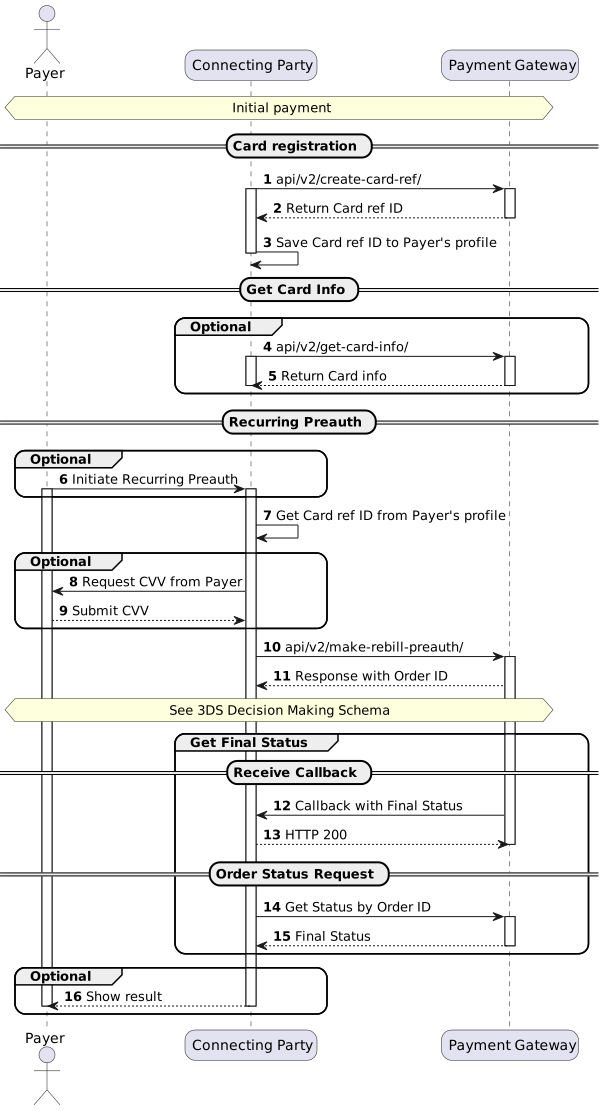
Recurring Preauth Flow
Note
Initial payment transaction type and implementation depends on Connecting Party business model. Please contact Neogate support team to get relevant integration Use-Case for initial payment.
(1) To implement Card registration and get Card reference ID see /api/v2/create-card-ref/.
(4) To implement Card information request by Card reference ID see /api/v2/get-card-info/. The contents of response to this request can be used to show information about previously used card to Payer or to update Connecting Party database. This request can be made anytime if Connecting Party has Card reference ID.
(6) Recurring payment can be initiated by Connecting Party based on internal business model or Payer’s request.
(8, 9) Connecting Party sends request to the Payer to submit the CVV/CVC (Card Verification Value/Code), if it is required for selected processing channel.
(10) To initiate recurring preauth transaction see /api/v2/make-rebill-preauth/. See 3DS Decision Making Schema and 3DS Implementation Scenarios to correctly implement possible 3DS scenarios.
(12) To implement callback with final status handling see Connecting Party Callbacks.
(14) To implement order status see /api/v2/status/. Status should be requested multiple times with 3-5 seconds interval until final status will be received in response.
(16) Results of operation can be sent by Connecting Party based on internal business model or Payer’s request.
3DS Decision Making Schema
Connecting party has to implement all steps marked in green and purple. Below are the description for steps which reference specific API commands according to the step ID:
(1) To implement order status request see /api/v2/status/. Status should be requested multiple times with 3-5 seconds interval until final status will be received in response.
(4) If html and redirect-to fields are present, see Simplified authentication flow with html page.
(5) The same as point (1).
Note
The 3DS decision making schema is showcasing 3DS being initiated and performed by Payment Gateway. For other 3DS implementation scenarios, see 3DS Overview
Non3D Flow
Sale transaction should be considered as non3D (no 3DS authentication) if all conditions are met:
1. Steps 1-2-(5)-6 of 3DS decision making schema were followed.
2. tds_status, html and redirect-to parameters were not present.
3. Transaction received final status (approved, declined, error, filtered).
Note
Please note that transaction status “unknown” might appear for both 3DS and non3D transactions. See details in Statuses.
Simplified Authentication Flow
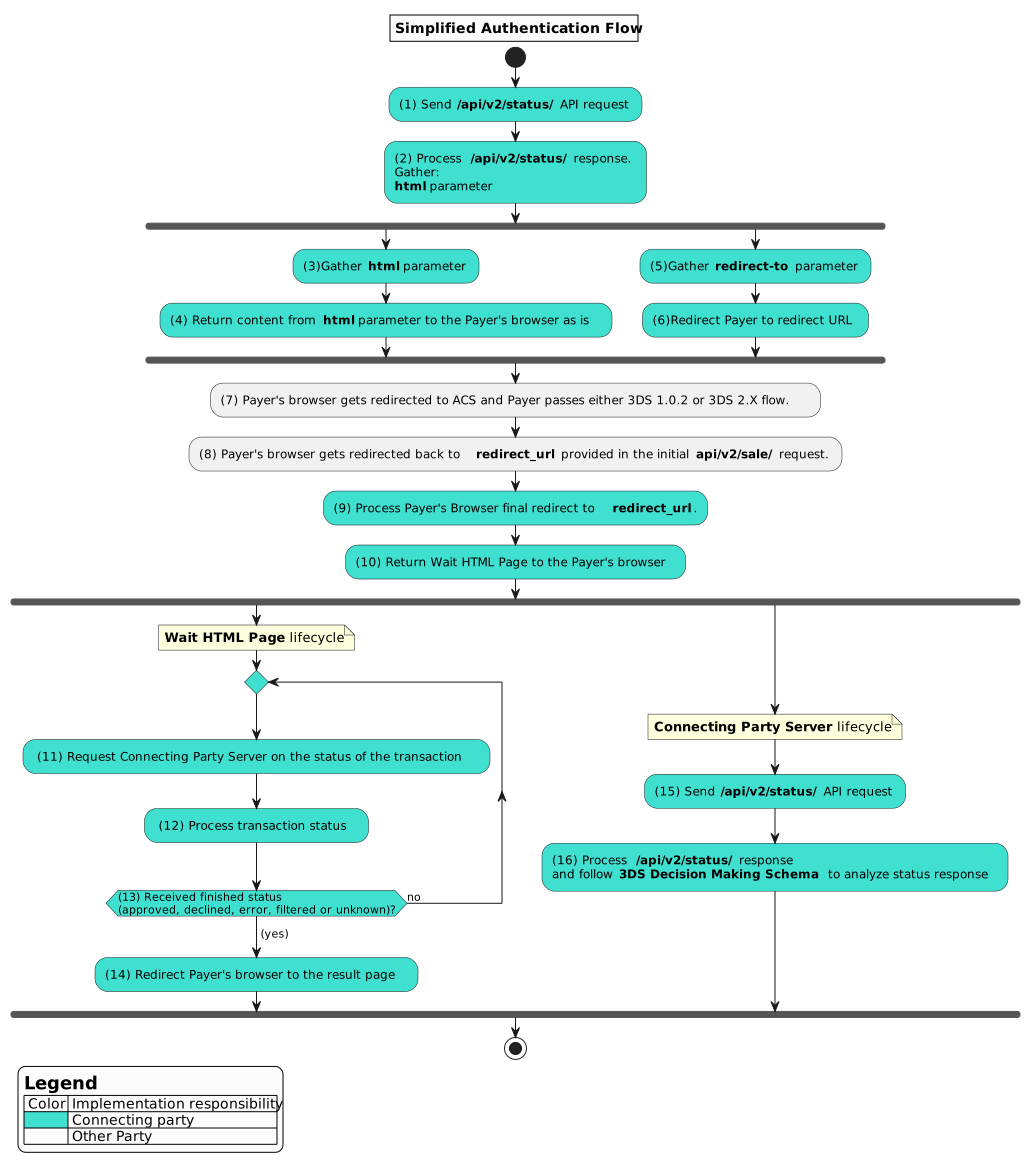
(1) and (2) To implement order status request see /api/v2/status/.
(9) To implement final redirect see Final redirect.
(10) The HTML wait page on Connecting Party side can have custom design and should communicate with Connecting Party server as described on the diagram.
(15) and (16) The same as point (1) and (2).
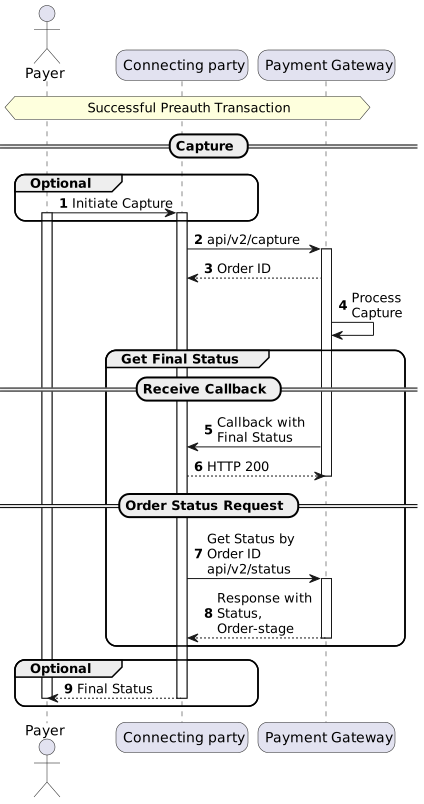
Capture Flow
(1) Capture can be initiated by Connecting Party based on internal business process or Payer’s request.
(2) To implement capture request see /api/v2/capture/.
(5) Callback for Capture will be sent only if notify_url was provided in initial transaction request or additional callback URL for Capture transactions is specified on the endpoint level. If server_callback_url was provided in initial transaction request, callback for Capture will not be sent. To implement callback with final status handling see Connecting Party Callback.
(7) To implement order status request see /api/v2/status/. Status should be requested multiple times with 3-5 seconds interval until final status will be received in response.
(9) Final Status can be sent by Connecting Party based on internal business model or by Payer’s request.
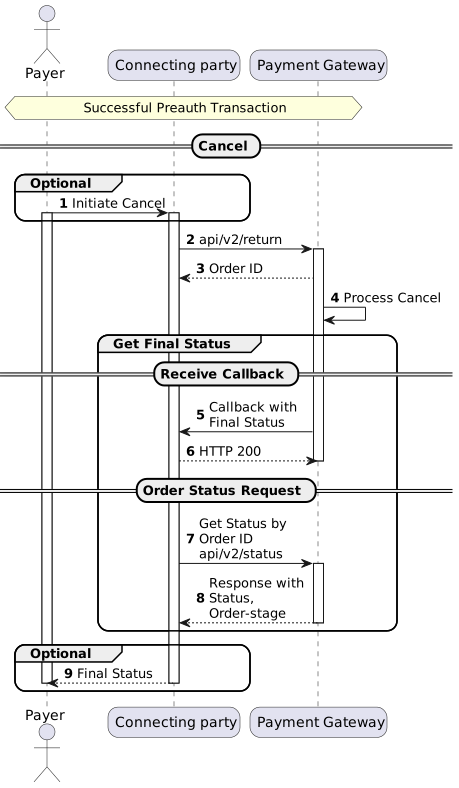
Cancel Flow
(1) Cancel can be initiated by Connecting Party based on internal business process or Payer’s request.
(2) To implement cancel request see /api/v2/return/.
(5) Callback for Cancel will be sent only if notify_url was provided in initial transaction request or additional callback URL for Cancel transactions is specified on the endpoint level. If server_callback_url was provided in initial transaction request, callback for Cancel will not be sent. To implement callback with final status handling see Connecting Party Callback.
(7) To implement order status request see /api/v2/status/. Status should be requested multiple times with 3-5 seconds interval until final status will be received in response.
(9) Final Status can be sent by Connecting Party based on internal business model or by Payer’s request.